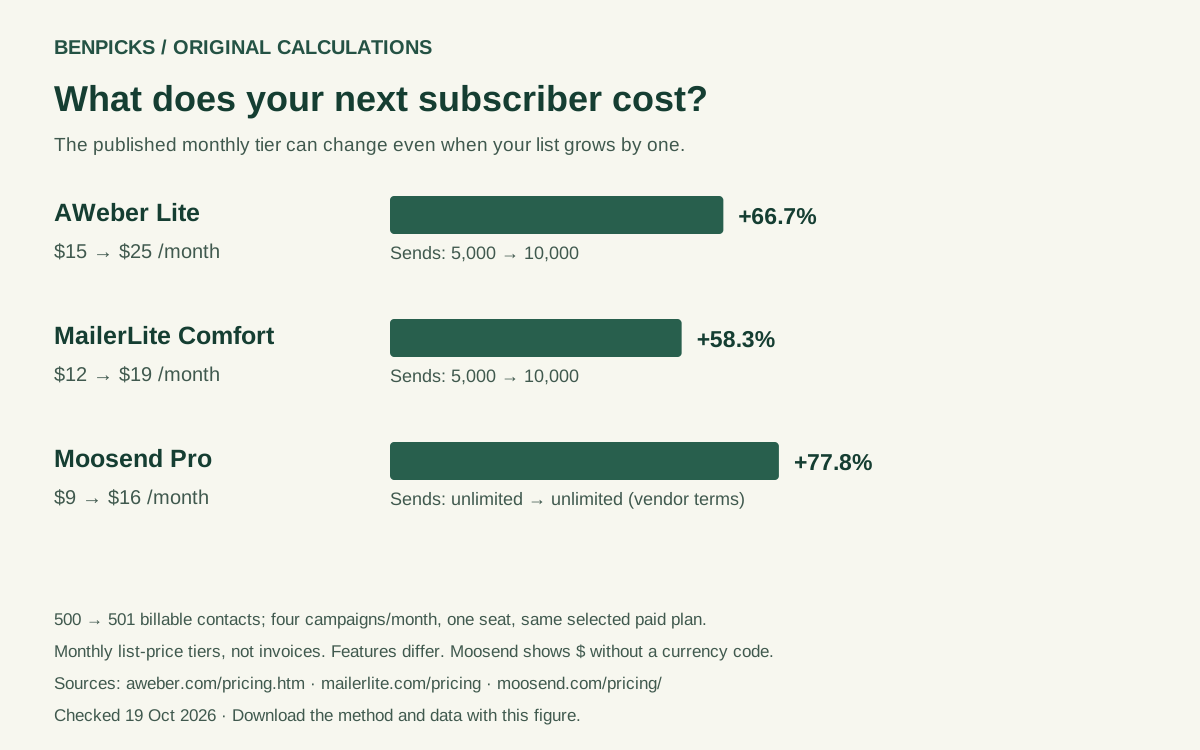
Three examples at the 500-contact boundary
With four full-list campaigns per month and one user, moving from 500 to 501 contacts changes the modeled workload from 2,000 to 2,004 sends. Here is what the selected tiers show:
| Selected plan | Monthly price, before → after | Increase | Contact capacity, before → after | Monthly send allowance, before → after |
|---|---|---|---|---|
| AWeber Lite | $15 → $25 | $10 / 66.7% | 500 → 1,000 | 5,000 → 10,000 |
| MailerLite Comfort | $12 → $19 | $7 / 58.3% | 500 → 1,000 | 5,000 → 10,000 |
| Moosend Pro | $9 → $16 | $7 / 77.8% | 500 → 1,000 | Unlimited, subject to vendor terms |
The percentages describe changes within each named plan. They do not establish which provider offers the best value. MailerLite displayed USD. AWeber’s USD classification comes from our retained calculator dataset; the captured price table displays $. Moosend’s captured selector displays $ without confirming an ISO currency code, so its amounts must not be ranked against confirmed USD quotes.
The complete download also covers MailerLite Power and later contact boundaries, including Moosend’s 2,000 and 3,000 tiers. AWeber pricing, MailerLite pricing and Moosend pricing are the source surfaces; the dated input file records the selected tiers.
Start with the number your provider bills
Your address-book total may differ from the billing counter. Before using the calculator, check the account’s subscriber definition and the period over which it is counted.
MailerLite’s pricing FAQ distinguishes active subscribers from unsubscribed or bounced addresses. It also uses a cumulative billing-cycle count: an address that was active during the cycle can still count after deletion until the billing anniversary. Removing contacts today therefore does not necessarily move this cycle’s bill below a threshold.
Moosend’s pricing page says an address appearing on several lists is counted once. Do not sum every list independently and assume that is the billable total. AWeber’s billing FAQ describes capacity-based upgrades; use the applicable counter in your own account rather than importing another vendor’s definition.
Free plans, old contracts and special offers are outside this sample. A change from a free plan can alter features and support as well as price, making it a different decision from moving between contact tiers in the same paid plan.
Your next constraint might be sends, not subscribers
Four newsletters to 500 contacts require 2,000 sends. Eleven newsletters require 5,500. Welcome messages, abandoned-cart flows and other automations add to that workload, even when the list itself barely grows.
For AWeber Lite, the captured 500-contact tier includes 5,000 monthly sends. The vendor’s FAQ describes an automatic upgrade to a tier that supports a higher send count. In our bounded model, 500 contacts with 11 full-list campaigns therefore select the captured $25 tier rather than the $15 tier.
MailerLite Comfort has a different documented path. Its allowance is ten times the ceiling of the subscriber tier, not ten times the exact current list size. The up-to-1,000 tier therefore has 10,000 sends. If the allowance is exhausted, the FAQ offers upgrading to Power or waiting for the reset. Our calculator does not invent a larger Comfort tier as an available send-overage remedy: it returns no supported quote for that workload and explains what to check.
An unlimited-sends label also needs context. This worksheet preserves the vendor qualification rather than treating the label as a guarantee about every automation, integration or use case. The controls model equal full-list campaigns; use the email marketing cost calculator to explore a workload expressed as total monthly sends.
How to use the result before the next billing cycle
- Read your provider’s billable-contact counter and billing date. Record the current tier and send allowance.
- Estimate contacts for the next cycle, including an upcoming launch or import. Add campaign and automation sends separately; do not count an entire workflow as one email.
- Compare the captured capacity band before and after the boundary. If either input is beyond this sample, get a current quote rather than extrapolating.
- Check which features you need to retain: automation branches, ecommerce events, seats, permissions and integrations. A cheaper tier that cannot run the workflow is not a substitute.
- Confirm upgrade timing and downgrade rules with the vendor. A lower contact count is not proof of an automatic lower invoice.
Only remove contacts when it is appropriate for consent, data quality and your retention policy. Deleting an opted-in audience just to stay under a line on a chart can damage a useful asset without fixing the current billing count.
When is migration worth investigating?
A price step is a prompt to review the budget, not a recommendation to migrate. Include template rebuilding, automation testing, forms, ecommerce connections, staff time and an overlap period in which both subscriptions are active.
For illustration, suppose an alternative saves 10 currency units per month, while migration requires eight hours valued at 25 units per hour and 30 units of overlapping subscriptions. The one-off planning cost is 230 units; the simple payback period is 23 months. Those are hypothetical inputs, not measured migration times or vendor quotes. If a required integration is missing, the payback calculation alone cannot make the switch workable. Use our email migration checklist before deciding.
Method, downloads and citation
We reused the existing BenPicks eligibility engine with a separate, dated local dataset: 17 captured paid monthly tiers, four selected plans, 13 contact-boundary comparisons. Each row compares exactly n and n+1 billable contacts, keeps the named plan constant and assumes four full-list campaigns and one user. The sample ends at 5,000 contacts.
The absolute change is the new monthly tier price minus the old one. The percentage change is that difference divided by the old price, multiplied by 100. For example, MailerLite Comfort’s $12-to-$19 step is 7 ÷ 12 × 100 = 58.33%, shown as 58.3% in the article. The machine-readable download retains two decimal places for percentage changes.
Download the price inputs, all 13 calculations and the source-labelled chart. Rows retain plan, currency qualification, contact capacity, sends, billing cadence, source and check date. A publisher citing one row should retain those assumptions, not turn a tier difference into a per-subscriber charge. The captures are the first dated observation for this resource; they do not establish a history of price increases over time.
Taxes, promotions, annual billing, foreign-exchange charges, SMS, transactional email, overages, migration and invoice proration are excluded. Public prices can change; legacy or negotiated contracts may differ. We have not collected customer account data or tested the products’ deliverability. Confirm the current applicable quote before purchasing.
Questions readers ask
Will my bill rise every time someone subscribes?
No. Within a capacity band the modeled monthly price is unchanged. The increase occurs when the workload requires another captured tier. Actual billing timing depends on the vendor and your account.
Does the biggest percentage increase mean the worst value?
No. A percentage depends on the starting price, and the larger tier also adds capacity. Features, currency and billing rules differ. This is a threshold worksheet, not a cross-provider value score.
Can I use this for annual plans or more than 5,000 contacts?
No. The dataset contains monthly tiers up to 5,000 contacts. Use a fresh applicable quote for other cadences, higher volumes or plans outside the named sample.