First identify the balance
An account can show several kinds of allowance at once. Separate them before making a calculation:
- Included monthly credits: the allowance attached to the recurring plan.
- Opening rollover: included credits retained from an earlier cycle under the plan’s policy.
- Purchased extras: separately bought credits or pay-as-you-go balances, with their own conditions.
- Trial or promotional balances: not necessarily governed by paid-plan rules.
Enter only included credits and permitted opening rollover in this calculator. Do not add a purchased balance to the monthly allowance. If the account does not distinguish them clearly, check billing documentation or ask the vendor before relying on a number.
Use the account’s billing reset, not the last day of the calendar month. A renewal on the 14th and a renewal on the 28th create different planning windows even when both subscriptions are described as monthly.
What the three policies say
| Provider and modeled scope | Unused included monthly credits | Separately purchased balance |
|---|---|---|
| InVideo: paid monthly credits | Reset without rollover | Extra credits last up to 12 months from purchase or until the paid subscription ends, whichever happens first |
| Runway: Standard / Pro | Expire on the billing date | Purchased credits do not expire; plan access can still affect available features |
| ElevenLabs: same paid self-serve plan continues | Up to twice the monthly quota can roll into the next cycle | PAYG credits expire 12 months after purchase; plan changes can adjust the balance at the new rate |
The sources are InVideo’s plans and credits guide, Runway’s credit guide and ElevenLabs’ renewal and quota guide, checked on 19 October 2026.
Runway also lists Unlimited’s monthly credits under the expiry rule; Max and Team have a different rollover arrangement. We have not modeled those other plans as Standard or Pro. ElevenLabs downgrade and cancellation rules can remove unused plan credits at cycle end. The continuing-plan example below must not be used to predict a cancellation outcome.
One quiet month: 40% used, three outcomes
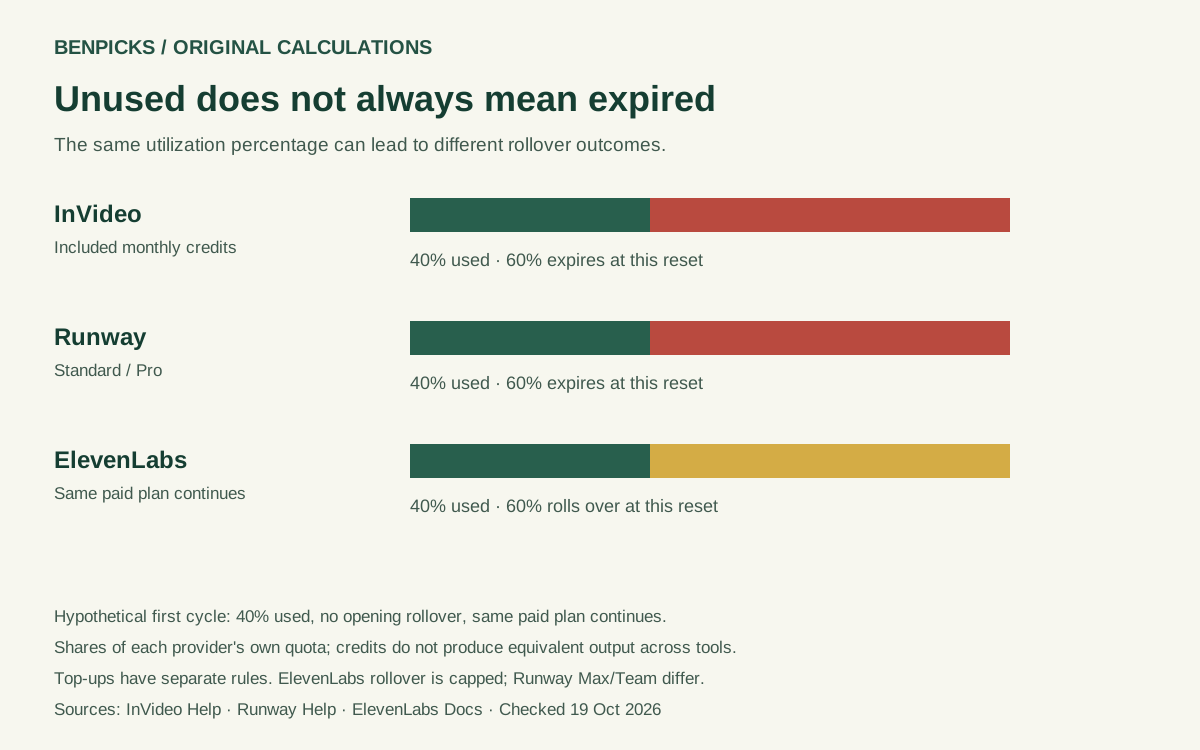
Imagine a first cycle with an allowance of 1,000 units, usage of 400 and no opening rollover. These are normalized hypothetical units, not the actual allowance of any vendor’s plan.
Under the InVideo included-monthly-credit rule, 600 unused units expire at reset. Under the Runway Standard/Pro rule, the same arithmetic applies. Under the continuing ElevenLabs paid-plan rule, 600 units fit within the rollover cap and carry into the next cycle. They are unused at the end of this cycle, but they have not expired at that reset.
The chart compares shares of each provider’s own allowance, not equivalent work. A voice credit and a video credit do not buy the same output. You cannot infer generation quality, minutes of usable material or the cheapest tool from the identical 1,000-unit examples.
The download includes nine scenarios: 25%, 50% and 75% usage for each of the three policy scopes. Each row records the assumptions, remaining balance, expiring amount, rollover and source date, so another editor can reproduce the arithmetic.
A rollover cap is not a promise that nothing expires
An allowance can roll over and still encounter a cap. In a simplified continuing-plan scenario, suppose the monthly quota is 1,000 units, opening rollover is 2,000 and usage is 400. The balance before reset is 2,600. A two-quota rollover cap retains 2,000 and leaves 600 above the cap.
That is a balance calculation under the stated policy, not a reconstruction of which vintage of credits expires first. The model does not establish credit aging or consumption order. It cannot tell you that a particular credit will remain valid for exactly two months. Use the vendor’s detailed account ledger for balances governed by additional aging rules or plan changes.
Is the unused portion wasted money?
The subscription pays for more than a credit counter. It may also provide editing tools, storage, export options, collaboration or access you value even during a quiet month. You cannot automatically convert 60% unused credits into 60% of the fee lost in cash.
The calculator offers an optional proportional fee-allocation proxy. If you enter a hypothetical monthly fee of 30 currency units and 60% of that cycle’s included allowance expires, allocating the entire fee by credit share produces 18 units. This is a way to label a budget, not a vendor price, refund, resale value or amount you will necessarily save.
We leave the fee blank by default. When you enter opening rollover, the money proxy is suppressed: this month’s fee cannot fairly be assigned to older credits without further information. You can still inspect the balance and cap calculation. Keep the output in your chosen currency; the worksheet does not convert currencies or compare providers’ prices.
What to do before renewing
- Record the next billing date and the included allowance for your exact plan.
- Separate purchased credits from plan credits and rollover. Check whether cancellation affects purchased extras as well as included credits.
- Look at several billing cycles of real usage. One quiet month is weak evidence for a lasting downgrade.
- Estimate planned work and revisions. Count the units used by your chosen model or output settings, not just finished clips or voice minutes.
- Compare a smaller plan, occasional top-ups or a different workflow only after checking features, access and total cost. Do not cancel first and discover that an export or balance you need depended on the subscription.
Do not generate material merely to empty a balance. Reviewing unnecessary output uses time and can turn a small unused allowance into a larger production cost. If batching work is practical, batch work you already need and can review properly.
For project budgeting, our AI video cost calculator separates generated attempts from usable footage. The TTS cost calculator helps model narration and revisions. Neither replaces the current credit policy in your account.
Method and limits
This is original derived analysis from dated public policies, not a study of customer behavior. Remaining included credits equal monthly allowance plus opening rollover minus usage. At reset, retained rollover is the smaller of that remaining balance and the modeled policy cap. The rest is classified as expiring under those assumptions. With a zero rollover cap, all unused included credits expire.
The calculator validates whole, non-negative units, disallows usage above the available balance and rejects opening rollover for a no-rollover policy. It covers InVideo monthly credits, Runway Standard/Pro and an unchanged ElevenLabs paid self-serve plan. It excludes purchased extras, account changes, enterprise annual allocations and credit aging. A blank or unavailable input is not replaced with a guessed vendor quota or price.
Calculations run in the page without an account login or usage import. This local worksheet adds no tracking, usage storage or subscription changes. The policy matrix and scenario CSVs can be downloaded alongside the chart; preserve the provider, plan scope, assumptions and source-check date when citing them. This is a first dated policy snapshot, not evidence that a vendor recently changed its terms.
Questions readers ask
Do all AI subscriptions reset unused credits every month?
No. The rule varies by vendor, plan and balance type. Included monthly credits can expire while a purchased balance in the same account has a different lifetime.
Does a two-quota rollover cap mean every credit lasts two months?
No. A cap describes the amount that can carry forward. It does not, on its own, establish consumption order or the lifetime of a particular credit.
Can I calculate my refund here?
No. The optional money output is a proportional allocation of a fee under your entered assumptions. Refund eligibility and actual savings require the applicable contract and account facts.