Budget the list you are building, not just the list you have
Try your own assumptions
No inputs are sent or stored. No tracking. Billing periods, not calendar invoice timing.
| Month | Contacts | Sends | Modelled USD |
|---|---|---|---|
| 1 | 1000 | 5000 | $20.00 |
| 2 | 1819 | 9095 | $35.00 |
| 3 | 2637 | 13185 | $60.00 |
| 4 | 3455 | 17275 | $60.00 |
| 5 | 4273 | 21365 | $60.00 |
| 6 | 5091 | 25455 | $90.00 |
| 7 | 5910 | 29550 | $90.00 |
| 8 | 6728 | 33640 | $90.00 |
| 9 | 7546 | 37730 | $90.00 |
| 10 | 8364 | 41820 | $90.00 |
| 11 | 9182 | 45910 | $90.00 |
| 12 | 10000 | 50000 | $90.00 |
Download example CSV · Assumptions and results JSON · Keep the planning checklist · Read the formulas · Download chart SVG · Historical MailerLite example with gaps
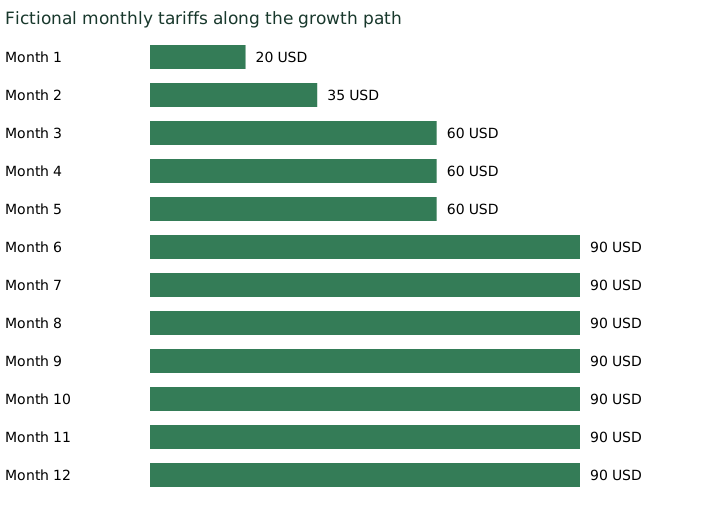
A newsletter starts January with 1,000 readers. The owner compares plans, chooses an affordable one and puts twelve times that monthly price into the budget. By autumn, the newsletter has several thousand more readers, a welcome sequence and a second weekly edition. The original quote still describes January perfectly. It no longer describes the business.
An email list growth forecast puts the twelve workloads beside the twelve bills. It helps a creator or small team see when a contact threshold, a sending allowance or a required feature changes the plan they need. It does not predict audience growth or calculate the cost of acquiring subscribers.
Start with twelve workloads
Write down the billable contacts and total sends you expect in each billing period. Four campaigns to 1,000 recipients mean 4,000 sends. Add welcome emails, follow-ups and other automations separately. A subscriber receiving three messages contributes three sends, not one.
Use the audience actually receiving each campaign. A campaign to a segment of 300 people does not require a send to every person in a 5,000-contact account. Equally, a welcome sequence can produce substantial sending even when the scheduled newsletter is quiet. For planning, use an explicit automation allowance; once you have operating data, replace it with your own expected workload.
The calculator's demonstration begins with 1,000 contacts in month one and ends with 10,000 in month twelve, increasing evenly between those endpoints and rounding intermediate counts up. That is a scenario, not a promise that a list will grow at that rate. Enter a flat path, a seasonal launch or individual monthly figures if those better describe your plans.
For the example, four full-list campaigns plus an assumed automation allowance of one send per contact produce five sends per contact per month. That allowance is a budgeting shortcut, not a claim about how welcome sequences behave. If all your automations concern only new arrivals, calculate those messages separately instead of applying the allowance to the entire list.
Find the plan that covers both numbers
A contact tier is only half the question. In the provider table, retain both the contact ceiling and the monthly send ceiling, along with the currency, billing cadence and date checked. A row qualifies only when both limits cover the workload. Check seats and required features before entering that row; this worksheet does not infer feature eligibility.
MailerLite's billing guidance describes a cumulative count of addresses active during the billing cycle, including ones subsequently deleted. It also describes upgrades for contact or sending limits. A month-end list count can therefore understate the count used for billing. Record the billable count under the rules applying to your account, rather than assuming that deleting contacts immediately reduces the bill. MailerLite billing guidance, checked 20 October 2026.
Brevo's documentation says the selected email volume determines the pricing tier and the maximum contacts stored. Treating it as a system with no contact constraint would miss part of the decision. Brevo plan documentation, checked 20 October 2026.
Those checks explain why the worksheet keeps contacts and sends separate. They do not establish a universal upgrade rule. Confirm your own plan version, account terms and invoice timing before relying on an estimate.
A worked year with fictional tariffs
The demonstration uses four invented monthly tiers: $20 for up to 1,000 contacts and 10,000 sends; $35 for 2,500 contacts and 25,000 sends; $60 for 5,000 contacts and 50,000 sends; and $90 for 10,000 contacts and 100,000 sends. These are arithmetic inputs, not prices offered by any vendor. All four assume the same required features and seats.
Under the five-sends-per-contact workload, the first month fits the $20 tier. Month two uses $35. Months three through five use $60. Months six through twelve use $90. The year totals $865, against $240 if you simply repeated January's price. The $625 difference belongs to this fictional growth path and tariff table; it is not a measured overcharge or saving available from switching providers.
The last month's $90 price multiplied by twelve would give $1,080, which is another misleading answer. That estimates a full year at the final workload. It ignores the cheaper months before the list reached that size. Keep the monthly rows when you share the total: they explain where it came from.
Change campaign frequency from four to twelve, retaining the one-send automation allowance, and the sending ceilings can become the limiting factor. A small audience with frequent messages may require a different tier from a larger audience with a monthly digest. Do not pick the cheapest contact tier and add its price before checking send volume.
An unknown month is not a zero-dollar month
The retained MailerLite Comfort table used in our earlier threshold work was captured on 19 October 2026 and stops at 5,000 contacts. We preserve it as a dated reference. It cannot price the end of a 10,000-contact year. The separate historical dataset therefore marks uncovered months as requiring a quote and leaves the annual total unavailable. Its subtotal covers known months only.
The fictional demonstration is complete because its inputs are complete. A provider forecast becomes complete only when the relevant amounts, capacities and required features have been confirmed. Never fill a missing tier by extending the previous price, treating a blank as free or assuming an unchanged cost per contact.
Keep cash commitments separate
This model sums monthly service estimates. It is not an invoice simulator: it does not apply mid-cycle proration, tax, discounts, automatic downgrades or annual prepayment. A provider might retain a higher tier after a busy month, so the cheapest eligible row in a later month is not a promised downgrade. Keep that difference visible when preparing a cash budget.
If you pay annually, record the upfront payment and any later upgrade charges in a separate cash schedule. An advertised monthly equivalent is useful for comparison but does not tell you when money leaves the bank. For monthly plans, confirm whether reductions take effect automatically, at renewal or only after a request.
Before choosing a provider, test a quieter year as well as the growth year. Hold the list flat, reduce campaigns and remove the launch. This is not a reason to avoid growth; it shows whether the commitment still fits if growth arrives later than expected. There is no revenue or conversion forecast hidden in the worksheet.
Take this to the next budget meeting
Keep a copy of the twelve monthly contact counts, the sending calculation, the tariff rows and their source dates. Mark the first month that needs a new quote. Name the person responsible for checking it before that month's campaigns begin.
Use the existing email cost calculator for a workload comparison, and the pricing threshold guide to inspect the next boundary. This forecast answers a different question: how those boundaries accumulate over a year. Choose a tool for the work you expect to do, then retain enough detail to revise the budget when that work changes.
Downloads and method
The downloads include the fictional 12-month schedule, a dated historical scenario with uncovered months, editable tariff inputs and the formula definitions. Amounts use USD cents; no currency conversion is performed. With zero contacts and zero sends, a paid tariff table still returns its cheapest eligible row; it does not invent a free plan. Enter a verified free tier explicitly if appropriate. The calculator handles only the volume and price rows entered. Labour, list acquisition, migration, tax and revenue remain outside its total.
BenPicks may earn affiliate commissions from some software links. The worksheet's fictional tariffs do not rank providers or determine editorial recommendations.
Published 20 October 2026. Public documentation checked 20 October 2026; the separately labelled historical tariff dataset remains dated 19 October 2026. Scenarios are hypothetical, not measured provider results.