One sentence changed. Now find every place it appears
Use the worksheet
Try your own assumptions
No inputs are sent or stored. No tracking. Hypothetical minutes, not measured performance. Zero affected assets gives zero update cost.
| Task | Minutes |
|---|---|
| Shared preparation | 60.0 |
| Source edits | 72.0 |
| Version adaptation | 144.0 |
| Version review | 180.0 |
| Publishing | 72.0 |
Download example CSV · Assumptions and results JSON · Keep the planning checklist · Read the formulas · Download chart SVG
The button used to say “Invite member.” Now it says “Add teammate.” The product team changes two words. Somewhere else, a training manager opens a spreadsheet of fifty tutorials and starts asking which ones still show the old screen.
Changing the sentence may take a minute. Finding it, replacing the screen, checking the translated narration and updating the places where people watch it can take much longer. A useful maintenance budget starts with the affected material, not the total length of the library.
This worksheet helps support, training and product teams estimate a defined update. Its examples are hypothetical planning inputs, not measured editing times or product benchmarks. Replace the minutes with your own records when you have them.
First find what actually changed
Make a small change register before opening an editor. Record the old wording, the replacement, the product version and the date it becomes applicable. Then identify which tutorials contain that instruction. A fifty-video library does not automatically mean fifty edits.
Separate a label change from a workflow change. If the button moves into another menu, the viewer may need a new screen sequence, not just new narration. If permissions change, the instruction may need to explain who can perform the action. If the workflow is unchanged and only the caption contains a typo, regenerating the speaker or recording the whole process adds work without addressing a larger problem.
Give each affected source tutorial a stable identifier. Beneath it, list the language versions and the destinations that need replacement. Include help-centre embeds, learning platforms and exported files where relevant. Keep the inventory free of customer information; a URL and an internal asset identifier are enough for planning.
Count sources and versions separately
Consider a fictional library of fifty source tutorials. Twelve contain the changed instruction, and each of those twelve exists in three language versions, including the original language. There are twelve source edits and thirty-six versions to check. Multiplying fifty by three would charge the update to material it does not affect. Counting only twelve would miss the work across languages.
The simple calculator assumes every affected source has the same number of language versions. If yours vary, run separate groups and add their results, taking care to charge shared preparation once. The worksheet's per-version publishing minutes must include the destinations you intend to replace; it does not independently multiply by the number of embeds or export formats.
This distinction matters when comparing tools. A convenient source editor may still leave a separate caption, exported MP4 or detached document to update. Ask where the change propagates and where it stops, then put the remaining tasks into the estimate.
Budget the full correction
The model separates five pieces of work: shared preparation, editing each affected source, adapting each language version, reviewing each version and replacing the published material. Source editing covers the base correction; the per-version adaptation allowance covers narration, timing and caption handling for every language version, including the original. Set it to zero where the source allowance already covers those tasks so you do not charge twice.
Reviewing means watching and listening to the changed passage in context, checking captions, visible controls and the intended action. It is not a claim that a language version is accurate merely because it was generated successfully. Use an appropriate reviewer for the language and subject. If a qualified review costs a separate amount, include it in the external charges or use a labour rate that accounts for that work, without counting the same cost twice.
A local correction can affect timing beyond the replaced words. Check the transition into the next instruction and whether an on-screen highlight still coincides with the narration. The review allowance should describe that task, rather than only the duration of the newly generated audio.
Map the assets affected by a revision
For each change, record the approved source script and the outputs that depend on it: narration, timing, captions, on-screen instructions, translations and delivery copies. Draw a dependency only when a change in the parent can require inspection or rebuilding of the child. One source can feed several outputs, and several changed sentences can feed the same output.
A dependency is a reason to inspect, not proof that a rebuild is needed. Correcting a name in a caption might leave the spoken narration approved. Replacing a longer spoken instruction can require a timing check even when the caption text is accurate. Have the relevant editor decide the actual impact.
The Guidde example in the editing-features section illustrates a dependency that needs a separate check.
Count assets once
Consider three hypothetical changes, C1, C2 and C3. C1 affects the English narration N and caption S. C2 also affects S and an on-screen label V. C3 affects N and a translated narration T. All three source changes are assumed to land in one agreed revision batch before any inspection starts, and each child ID refers to its one resulting version. There are six dependency edges, but only four distinct affected assets: N, S, V and T.
If a fictional team allocates four minutes to inspect each affected asset and ten minutes once to agree the source change, the review allowance is 10 + 4 × 4 = 26 minutes. Charging per edge gives 34 minutes and duplicates eight minutes of inspection. Neither value is a forecast or a measured editing time. In the twelve-tutorial example below, the ten-minute allowance substitutes for the shared preparation line for this small fictional brief, and the 16-minute asset check substitutes for the review allowance for these four asset versions. They are not added on top of the 60-minute preparation in the twelve-tutorial example below or five-minutes-per-version review. Keep editing, adaptation and replacement separate; this 26-minute scope does not include them. When a source/language version contains several checked assets, allocate the asset checks within its review allowance rather than charging both methods. A separate full watch-through, specialist translation review or actual rebuild belongs on an additional line when required; it is not covered by the four-minute assumption.
Use the stable asset ID as the deduplication key. Do not merge two language files because both are called narration, or count two references to the same approved caption file as separate assets. If an asset changes again after inspection, its new version needs a new result; deduplication must not erase rework.
Decide whether to repair or inspect
If the approved wording changes meaning, inspect every dependent output whose meaning can change. If the text is unchanged and only one delivery copy is corrupt, isolate that copy before regenerating the source. If synchronization is unknown, keep the child open until its actual output is checked. A generation-success message cannot close a language or editorial review.
The reusable sheet records change ID, parent, child asset, version, required inspection, rebuild decision, owner and result. A change closes only when every affected asset has an accepted result or an explicitly accepted exception. Keep credentials and confidential content out of the public template.
The twelve-tutorial example
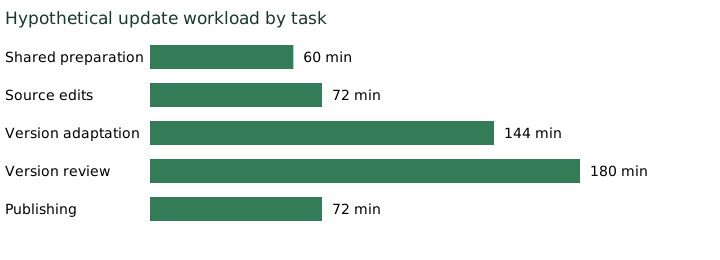
Assume one hour of shared preparation, six minutes per source edit, four minutes of adaptation per language version, five minutes of review per version and two minutes per version for replacement and verification. At twelve affected tutorials and three versions each, the calculation is:
| Task | Assumed workload | Time |
|---|---|---|
| Shared preparation | Once | 60 minutes |
| Source edits | 12 × 6 minutes | 72 minutes |
| Language adaptation | 36 × 4 minutes | 144 minutes |
| Review | 36 × 5 minutes | 180 minutes |
| Replacement and verification | 36 × 2 minutes | 72 minutes |
| Total | 528 minutes, or 8.8 hours |
At an assumed blended labour rate of $40 per hour, that is $352 of labour. Add an independently entered $9 of incremental tool or external charges and the example totals $361. That $9 is an invented project allowance, not a provider tariff or an implied price per generation.
If all fifty tutorials required the same work, the result would be 33.5 hours and $1,340 of labour. Using a separately assumed $37.50 of incremental charges would bring that scenario to $1,377.50. The comparison shows the consequence of the affected scope, not a saving proven by a particular tool.
Editing features do not guarantee an automatic update
Guidde documents visual, speaker and transcript editing, with changes applied to the final video through its editor. It also documents a detached document mode in which written steps can be edited independently of the video. Check both outputs if you use that mode. Guidde also warns that restoring sync replaces the detached document with the video content, so retain any document-only changes you need before doing so. Guidde video editor and document editor, checked 20 October 2026.
Descript's Regenerate documentation describes script and audio editing workflows, with optional video regeneration. Its current overview limits Regenerate to English audio and video, and excludes some visual situations such as B-roll and multi-speaker recordings from video regeneration. That does not establish that a revised narration updates every exported copy or every language version. Confirm the workflow, permissions, consent and plan limits for the correction you intend to make. Descript Regenerate overview, checked 20 October 2026.
These examples identify questions to ask of an editor. They do not compare output quality or establish which product completes a correction faster. Our software tutorial tools guide can help you shortlist tools; use this worksheet to define the update they must support.
Credits and labour belong on different lines
Enter only incremental charges for the update in the project total. An existing subscription is not a new cash payment each time you use it, although included credits may be consumed and additional capacity may be required. Record credit consumption alongside the estimate rather than automatically adding an allocation of the monthly fee as another purchase.
If the update forces an upgrade, add the incremental payment attributable to it and state your allocation. If you are comparing full ownership costs, prepare a separate subscription budget. Mixing those two perspectives makes a small correction appear either free or more expensive than the actual project commitment.
The voice cost guide and video cost guide provide related generation methods. Keep attempts and regeneration charges separate from the time people spend checking what the audience will see.
Keep a record of the version you replaced
Before release, save the source identifier, language, destination, new version and the checker's sign-off. Verify the published destination after replacement, not only the editor preview. Retain the approved change record and a recoverable previous version where your workflow permits it.
The downloadable checklist includes the change register and a completion record. Start with one affected tutorial, record the work it actually required, and revise the estimate for the rest. A pilot can improve your own budget; one successful correction is still not evidence that every tutorial or language will take the same time.
The calculator deliberately excludes new-course production, provider quality scoring and promised support-ticket reductions. Its job is narrower: turn “we only changed a sentence” into a visible, reviewable update plan.
BenPicks may earn affiliate commissions from some software links. No vendor paid for inclusion in these hypothetical examples.
Published 20 October 2026. Public documentation checked 20 October 2026; the separately labelled historical tariff dataset remains dated 19 October 2026. Scenarios are hypothetical, not measured provider results.