Research guide · Evidence checked 2026-11-07
How to blur sensitive information in a screen recording
A practical, evidence-led decision guide. Product capabilities and limits are separated from anything that would require hands-on testing.
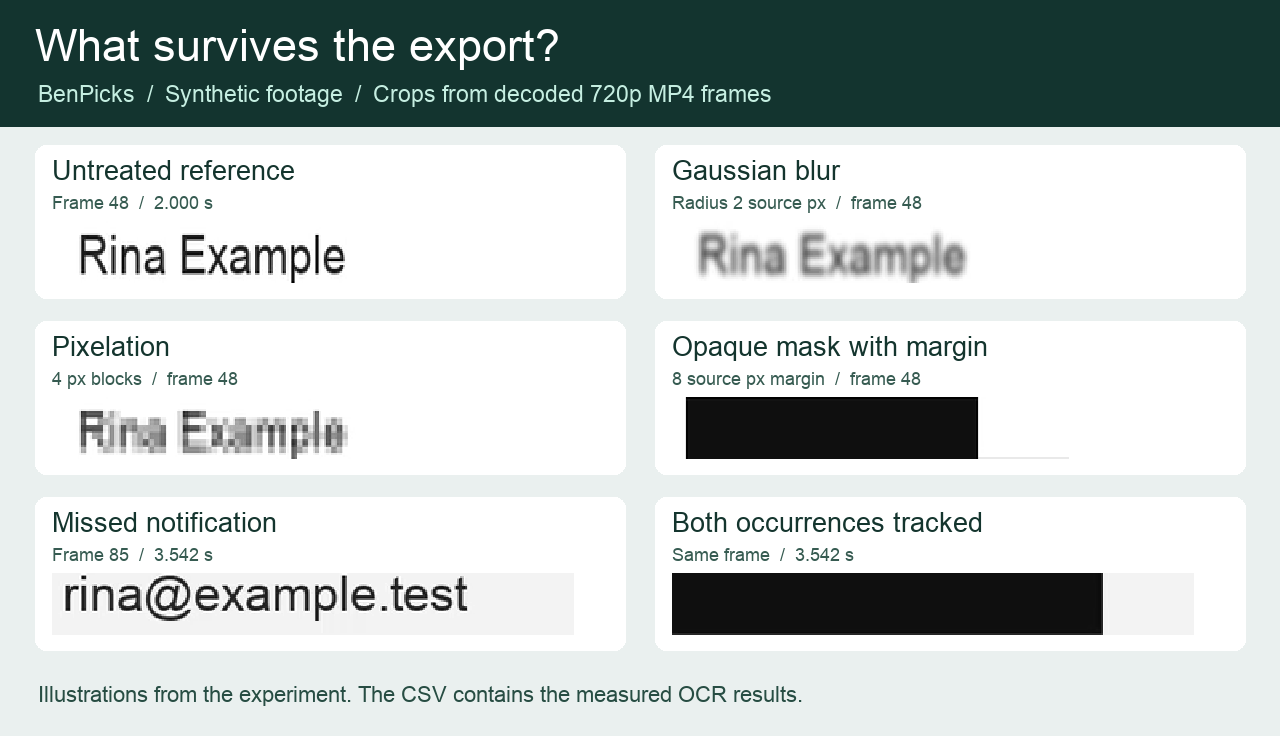
If a tutorial shows a customer email address or an internal ID, check the file the viewer will get. In our synthetic 720p exports, optical character recognition (OCR) recovered 15 of 36 and 14 of 36 full values after a 2 px blur. With 4 px pixelation, it recovered one full value in one export and zero in the other, with partial matches up to 12 and 8 characters, respectively. A solid mask that started six frames late left the sample email address visible for a quarter of a second. When you can re-record, start with demo data so the real values stay out of the recording.
What stayed readable after export
We rendered a fictional support screen with the same name, email address and demo ID in 12 layouts across two fonts, three text sizes and light and dark palettes. For each treatment we made two 720p H.264 exports and sampled frame 48 at 2 seconds. CRF 31 applies more compression than CRF 18. Each denominator counts only fields Tesseract read correctly in the unmasked export at that setting.
A full match ignores case. For the email address and demo ID it also ignores whitespace, and for the name it treats consecutive whitespace as a single space. We fixed the demo ID and those rules after a pilot misread some unmasked fields. The pilot is excluded from these results. We did not measure human readability. OCR can miss text that a viewer can still read.
| Treatment | CRF 18, full strings | CRF 31, full strings |
|---|---|---|
| Untreated control | 36/36 | 36/36 |
| Gaussian blur, 2 px | 15/36 | 14/36 |
| Gaussian blur, 4 px | 0/36 | 0/36 |
| Gaussian blur, 8 px | 0/36 | 0/36 |
| Gaussian blur, 16 px | 0/36 | 0/36 |
| Pixelation, 4 px blocks | 1/36 | 0/36 |
| Pixelation, 8 px blocks | 0/36 | 0/36 |
| Pixelation, 16 px blocks | 0/36 | 0/36 |
| Opaque mask, tight | 0/36 | 0/36 |
| Opaque mask, 8 px margin | 0/36 | 0/36 |
| Opaque mask, left 55% only | 0/36 | 0/36 |
Radii, block sizes and mask margins are measured in pixels of the 1440 × 810 source. At 2 px blur, every full match came from 24 px or 30 px source text. None came from 18 px text. The same blur radius can leave more detail on larger letters, so judge the effect at the text size and resolution of the export.
When the opaque box covered only the left 55% of each field, OCR matched a fragment of up to 8 consecutive characters and recovered zero full values. A full-string count misses partial exposure. Check the frame to see what is visible, since short OCR matches can occur by chance.
When a solid mask still misses text
We scripted four masking failures. The late mask starts six frames after the field appears. In the scroll scene, the field moves 6 source pixels per frame past a fixed mask. In the simulated zoom, the field grows and shifts 8 source pixels per frame. The counts reflect those scripted conditions. We checked all 144 frames of each six-second clip at 24 fps. Frame numbers start at 0 and run across the whole clip. The duplicate notification adds 18 observations to the 144 main-field observations.
| Scripted masking failure | What OCR recovered from the sample email address |
|---|---|
| Mask starts six frames late | 6 of 36 frames in that scene, frames 0–5. The email address was exposed for a quarter of a second. |
| Fixed mask while the field scrolls | 28 of 36 frames, frames 44–71. |
| Duplicate email address in a notification | 18 of 18 frames where the notification existed, frames 78–95. The covered main field returned 0 of 36. |
| Fixed mask while the view shifts and zooms | In late frames the mask covered only the first few characters. OCR matched up to 14 of the 17 characters and recovered 0 of 36 full email addresses. |
In the comparison export, an opaque mask with a margin followed the main field and covered the notification too. OCR returned 0 of 162 full matches. The untreated timing control returned 162 of 162.
Zero full OCR reads at blur radii of 4 px or more does not establish that those settings protect text. Hill and colleagues used hidden Markov models to recover text from blurred and pixelated still images. They assumed the attacker could identify the typeface, size and settings such as the pixel grid by hand. They reported near-perfect recovery for many common fonts and settings, concluded that blur and pixelation were unsuitable for redacting document text, and recommended a solid bar when the source could not be changed. Their study used still images. Our figures come from exported video frames and a single OCR pass. PoPETs study by Hill and colleagues ↗
Check the recording before sharing
- Replace sensitive values before capture when you can. Use a sample account and walk through the whole sequence, including autocomplete, tabs, menus and notifications.
- Apply masks on the final timeline. If you need to keep the recording, cover the entire field with a solid shape. A tight mask can reveal the length of a value, so cover the full field when that matters. We did not test length inference. Check the mask as the field moves and include any duplicate occurrences. Look closely at the first and last frames of every exposure, transitions and zooms.
- Inspect the exact exported copy. Play it once at normal speed and step through the risky intervals. Review narration, captions and the transcript separately. If the original was uploaded, check who can still access that copy.
- Ask where masking happens when you choose a tool. The workflow differs between capture, editing and export. For example, Atlassian documents Loom's dedicated blur tool for eligible roles and plans in its Chrome extension on supported DOM-based sites, before or during recording. The feature is unavailable in Loom's desktop app. Our experiment used synthetic footage and did not test Loom. Loom blur documentation ↗
For recurring software tutorials, use the Guidde vs. Trupeer comparison to plan who captures, edits and checks the exported copy. Give that reviewer the risky timestamps and the locations where a value can appear twice, such as the main field and the notification in our example.
Download the measurements and example clips
- Results CSV with all 1,278 observations, including the untreated controls.
- Untreated static clip, 2 px blur, 4 px pixelation and opaque mask with margin.
- Timing control, timing failures and timing with tracked masks.
The CSV includes clip names, frame numbers, OCR output, full matches, character error rates and the longest matching substring. The example clips let you inspect selected measurements. The experiment used three repeated values, two fonts, two export settings and Tesseract 5.2.0 with known crop locations. Treat the numbers as observations of those exported frames. We used silent synthetic clips, so the counts cover visible text only. The results do not establish security, anonymization or the performance of any specific recorder or editor.